Understanding Git Workflow and Social Coding
Day 2 of 30

Git is among the most frequently used tools for modern developers. Git is a distributed version control system that tracks changes in any file system. Originally developed by Linus Torvalds, it is widely used in software development teams because it eases collaboration.
On day 2, we will explore how software development teams use Git to continuously integrate changes to their main code base and reduce the risk of combining pieces of code that might break the entire software in production.
Social coding refers to the process of contributing to an open-source project. From interacting with the community on some "opened issue" or "PR/MR" to creating a copy of the project, making the desired changes and then proposing the solution back to the project maintainers/owners for reviews/discussions and then merging it to the project. Open-source communities have used this process for years, and enterprises have adopted it widely(the rise of Inner Source).
In general, with social coding, you
explore problems on the project;
discuss the solution with the community;
fork the repository;
clone your copy of the repository to your local environment;
make the required updation and push it to your copy of the repository.
finally, create a request to merge your solution to the main repository.
Underneath, we need to use Git to push our changes and control the code's version to ensure consistency with the main project.
With Git, you
- clone your copy of the main repository
git clone <project's https url>
- checkout the main branch and update it.
git checkout main
and git pull
- create a new short-lived branch from the main branch. It's short-lived because it is recommended and safe to delete the branch after it is merged into the main branch.
git checkout -b new-feature-branch
Now that you have a new branch, you can add your code, and once you are done, the process continues.
- add your changes to the staging area. This area does not affect the remote one(your copy or the main repository).
git add .
Note: Use only the "." if you are sure your ignore file contains all the unnecessary files and directories you want to avoid pushing them to your remote repository.
- Commit your changes
git commit -m "my new feature"
Now, you are ready to push the changes to your copy of the main repository. As the new branch is not remote yet, you can't just push; you need to publish the branch and then push the changes. Because Git is so powerful, you can do all that at once using only one line command.
git push -u origin <new-feature-branch>
This command will publish the branch and push the changes automatically. Next time you need to push changes from this branch(if needed), use the command "git push" without the arguments.
Now, you can create a PR/MR from your copy to the main repository using repository hosting platforms like GitHub and GitLab.
If you want to check if there are changes in any specific branch without pulling it to your local environment, you should use the command git fetch.
On the other hand, if you want to pull the changes to your local env directly, use the command git pull
If there are changes, git will automatically pull them; if not, a message indicating nothing to pull will be shown.
All this process is illustrated below.
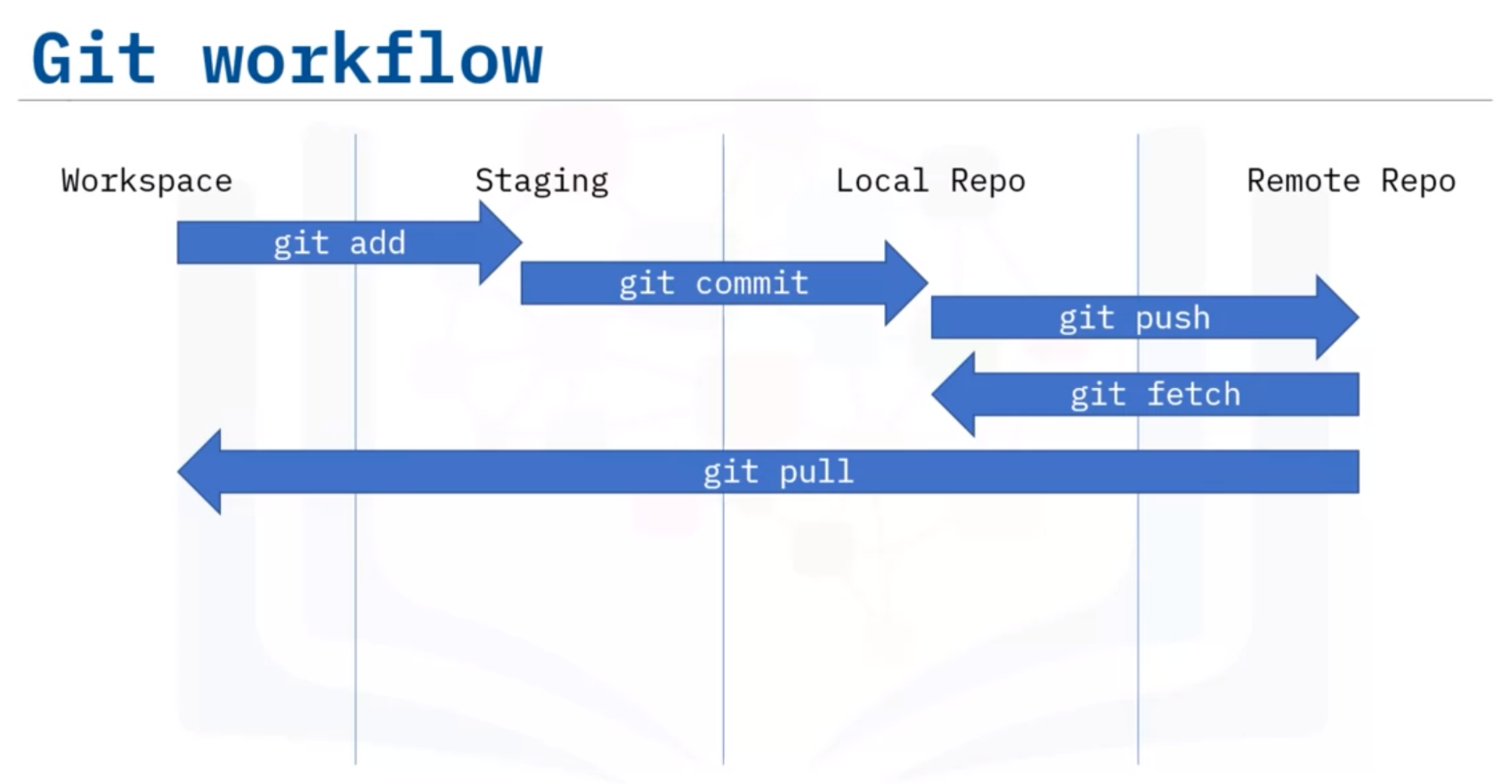
Using Git has a lot of benefits, and it allows developers to make changes independently on their local machine and then combine all the work done in one branch. Continuous Integration can positively impact the code quality by testing the changes before merging into the main branch, receiving reviews on your PR from other developers, and much more.
Read more:
https://about.gitlab.com/topics/version-control/what-is-git-workflow
https://www.ibm.com/garage/method/practices/culture/practice_social_coding/
Image source: https://coursera.org/share/11b7185765e62d40a801293e6fb9fa16
#opensource #30dayswritingchallenge #git #github
About the author
- Software Engineer with proven years of experience in the industry. Currently, contributing to the design and building of software financial solutions at Devexperts. Antonio Pedro is a Computer Science and Engineering graduate from Indraprastha Institute of Information Technology, Delhi, India. With a strong interest in distributed systems, cloud-native and related technologies, Antonio is also an LFX mentorship graduate contributing to Strimzi, a CNCF's incubating project. Apart from coding contributions, Antonio runs the Angola Open-source Community, a non-profit organisation that aims to promote the adoption and development of FOSS in Angola.
Comments
Join the discussionNo comments yet. Be the first to comment.
